text buffers
The joy of writing notes is gone
Lifelab was made as a very thin wrapper around a database, with code blocks that could query and modify the database. I was very obsessed with malleability (being able to modify my app to do things) and performance (the app should stay snappy forever), but in the process of optimizing this, I lost sight of the experience of actually writing down notes.
I must say it is not very good! In the following couple of blocks, will try to describe what did not work out at all for me.
V1 Jupyter notebook with todos
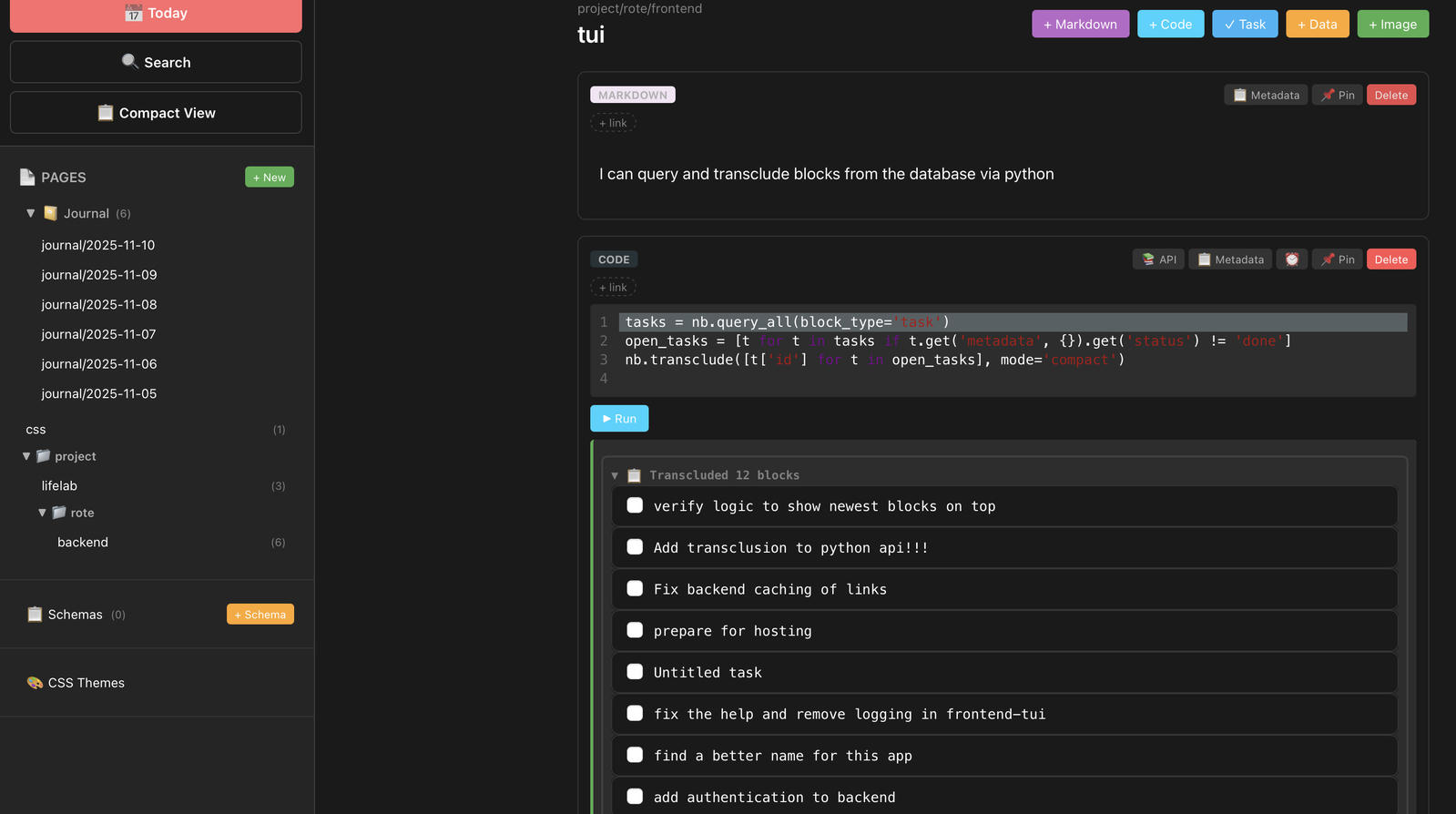
Let's start with the initial idea. I had a notion of blocks. Each block had a type like task, code, note or image. They all had optional metadata in form of a json dictonary. In the first screenshot, you can actually fully see the database schema, because I visualized every part of it on the block itself. You can see the first block is markdown and the second one is a code block. All of them were individual rows in one pile in the database.
This purity was very convenient and I loved the mapping. It was immediately obvious what block is what.
But this made adding a note to todays page obnoxious! I had to go and click on markdown, then modify the title and content. Making multiple paragraphs was a pain (repeated clicks) and it felt like making trello cards instead of taking notes. Even though each block had all information, it turned out to be a major visual overload. It also was not visually dense, I could only fit 6 blocks at a time in my view, which was dumb.
V1 block screenshot
:EXTRACTED_TEXT:(45 lines)
45 lines·858 charactersCopy
proiect/rote/frontend
tui
77 Today
+MarkdownCodeTask+ Data + Image
Search
MARKDOWN
? Metadata Pin Delete
? Compact View
Ican query and transclude blocks from the database via python
New
AGES
? Journal (6)
iournal/2025-11-10
journal/2025-11-09
journal/2025-11-08
iournal/2025-11-07
journal/2025-11-06
iournal/2025-11-05
CSs
f project
ifelab
rote
backend
Pin Delate
CODE
2 AP| Metadata
tasks = nb. query_alllblock_type-
open tasks = t t n tasks t.get( metadata, {}).get( status")!= 'done
nb.transclude( [t["d'] or  oDen tasks], mode= Coma
Rur
(1
d Transcluded 12 blockc
verify loaic to show newest blocks on top
Add transclusion to python api!!!
? Fix backend caching of links
prepare for hosting
Untitled task
 fix the help and remove logging in frontend-tui
 find a better name for this adp
? add authentication to backend
13
(6
Schem:
 Schemas
e: CSS Themes
:END:
V2, org inspired visual identity
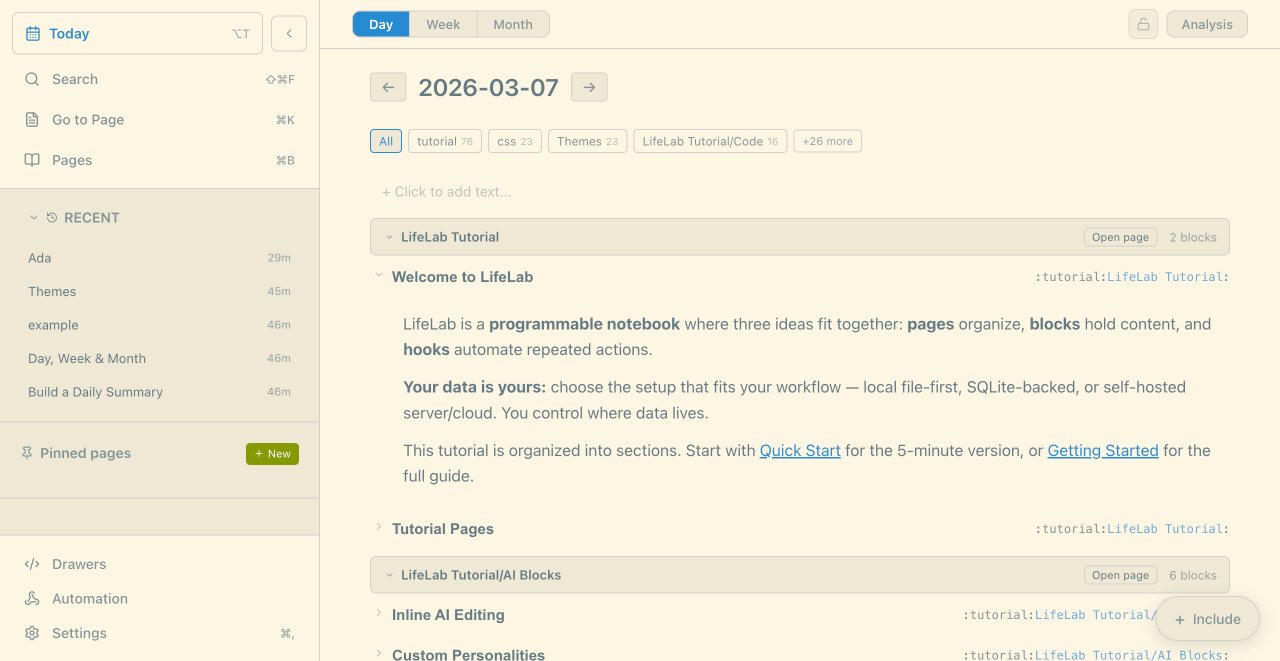
So manually clicking [+ Markdown] kinda sucks. There were some behaviors, like "if I am at the end of the current buffer and press enter, create a new block", but it just behaved like jupyterlab. In V2, I made all blocks "note" blocks by default, but you could transform them into other blocks like code or diagram by using a slash command. This was becuase most of my blocks were notes.
Furthermore, I wanted to have less visual clutter and pills, so I went to more text-based decoration like in org mode. I liked in orgmode you add :tags:like:this:
I separated blocks into title and content, making title mandatory. I realized doing this split means for tasks, we can have single row TODO in title, and for longer text we can have header and content which can be collapsed. The title would also hold all tags which made it more informative.
I thought it was visually denser (but I could also argue it is a web app cosplaying as a terminal app)
I still kept a lot of card styling and kept a different (more generic) visual identity for mobile view, but you can see the the tagging and the collapsible header in the screenshot.
V2 title and content
:EXTRACTED_TEXT:(52 lines)
52 lines·1,021 charactersCopy
Day Week Month
Analysis
C7
? Today
Q Search
? Go to Page
T Pages
07
BK
B
2026-03-07
more
All tutorial 7C 23  Themes 23 Lifel ab Tutorial/Coae
Click to add text...
ado
t RECENT
Ada
Themes
examnle
Day, Week & Month
Build a Daily Summary
Lifel ab Tutorial
Iifelah
Open page2 blocks
:tutorial:LifeLab Tutorial:
29m
16m
EArr
6m
A6IT
Nelcome to
LifeLab is a programmable notebook where three ideas fit together: pages organize, blocks hold content. and
hooks automate repeated actions
Your data Is yours: choose the setup that fits your workflow  ocal file-first SOl ite-backed or self-hosted
server/coud You control where data lives
This tutorial is organized into sections. Start with Quick Start for the 5-minute version. Or Getting Started for the
full quide.
2 Pinned pages
New
:tutorial:l ifelah Tutorial.
Tutorial Pages
?/> Drawers
 Automation
E?7 Settings
Lifel ab Tutorial/Al Blocks
Inline Al Editing
Custom Personalities
Open page 6 biocks
:tutorialli folah Tutorial
:tutorial:lifel ah Tutorial/AT BLockS:
Include
18
:END:
V3, Merging title and content back!
Ok so I love collapsible title because it makes things compact, but the title and content were separate text input fields, which was very confusing to my one test user. For example, in the title, you can write CODE to turn the content into a code block, but you could not do that in the content. They both had different history so undo would only work on content.
There were weird behaviors when moving your text cursor from title to content and you couldn't do the reverse.
The solution was.. to merge title and content into the same codemirror instance, but have some minor parsing logic to split it and save to database in the correct format. Now each block is 1 codemirror editor. I hate parsing content, but this compromise lead to a better, smoother writing experience.
V4 (future?) Single buffer
Merging title and content felt good, because the editing experience was really smooth. The natural next thought is, what if the entire page is a single buffer? This would mimic Emacs / Obsidian, where you take notes, plop code blocks and TODOs, and the backend would parse it into the proper block database schema. This means when you query, you don't need to parse the previous text! (I HATE PARSING) Queries hit the database, but the current content is one seamless text editor. This makes jumping between headers seamless and you would have one global history and everything would just work. I was fairly excited to go this route, but the amount of parsing code, edge cases and bugs might have been too much to make this feasible. It also breaks the drawers system I previously built, where you can attach functionality to a block which is implemented in JSX. In text-only mode it was fairly hard to embed images and diagrams in codemirror in a satisfying way. I am not sure it is sustainable for this project, or if I would have to spin out another project.